
Desk Phones, Softphones or Both? A Buying Guide to Choosing a VoIP Phone System and Headsets
Author: Telrex
22 September 2026

Moving to a VoIP phone system is the easy decision. The harder one comes straight after: does everyone get a desk phone, does everyone use a softphone on their laptop with a headset, or do you mix the two? Get it right and the new system disappears into the background of the working day. Get it wrong and you'll be buying a second round of hardware within a year. This guide walks through the questions we ask every customer before we quote, so you can make the call with your eyes open.
Start with how people actually work
Forget the org chart for a moment and sort your staff into three groups. Desk-bound talkers take or make a lot of calls from one spot: reception, accounts, dispatch, sales desks, anyone in a contact-centre role. Movers spend the day between their desk, meeting rooms, the warehouse or the ute: managers, technicians, reps. Hybrid and remote staff split their week between the office and home, or are never in the office at all. Each group has a natural fit, and most businesses end up with a mix rather than one answer for everyone.
Option one: IP desk phones
A desk phone is a dedicated handset that plugs into your network and registers directly with the cloud phone system. Nothing else has to be switched on for it to ring. That's the whole argument for it: reliability and simplicity. A receptionist never has to find the softphone window behind a spreadsheet, a warehouse phone works when the shared PC is off, and a caller is never met with silence because someone's laptop went to sleep.
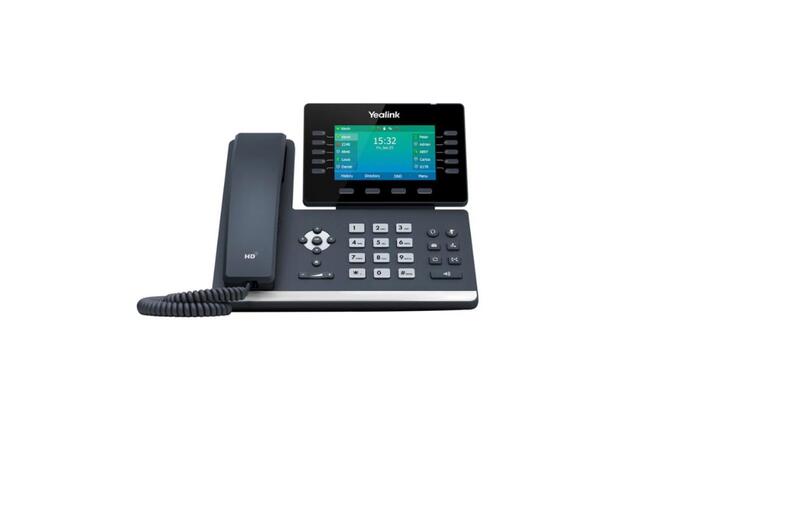
Desk phones also suit people who handle a high volume of calls with transfers, parks and busy-lamp keys showing who's free. Models like the Yealink T4 and T5 series and the HP Poly Edge E series give you programmable keys, a colour screen, and HD audio, and most modern handsets also have Bluetooth or a USB port so a wireless headset can be paired directly, giving desk-phone users the freedom to stand up and walk around while on a call. A cordless DECT handset is the answer for the warehouse, workshop or clinic corridor where a fixed phone is in the wrong place half the time.
The trade-offs: each handset is a capital cost, it needs a network point and PoE (Power over Ethernet) or a power adapter, and it's tied to one place, so it does nothing for the person working from home on Fridays. Most cloud systems let you pair a desk phone and a mobile app on the same extension, which covers a lot of that gap.
Option two: softphones with headsets
A softphone is the phone system running as an app on a laptop, desktop or mobile. Your extension follows you: same number at the office, at home, in a hotel. Because the phone is software, the headset becomes the hardware, and the quality of that headset decides how the whole system feels.
Softphones win on flexibility and cost. There's no handset to buy or find a network point for, staff can hot-desk, remote workers are fully part of the phone system, and if your team already lives in Microsoft Teams, a Teams-certified headset plus the phone system's Teams integration means one device and one app for calls and meetings. Click-to-dial from a CRM and on-screen call history are real productivity gains for sales and support teams.
The trade-offs are practical. The laptop has to be on, awake and connected; a headset battery has to be charged; and a bad Wi-Fi connection at home becomes a bad phone call. Some people simply prefer a handset and will hate having calls come through the computer. For high-volume roles a softphone works well only if the headset is up to it, which brings us to the next question.
Choosing the headset
If softphones are part of your plan, budget properly for headsets. It's the item most often skimped on and most often regretted. The main decisions:
- Wired or wireless. A wired USB headset is cheaper, never needs charging and is fine for someone who stays at their desk. Wireless (Bluetooth or DECT) lets people stand, move and grab a file mid-call, and is the right choice for anyone who also takes calls on a mobile. For desk phones, DECT wireless headsets with an EHS cable let you answer from the headset itself.
- One ear or two. Mono headsets suit receptionists and anyone who needs to hear the room. Stereo headsets with active noise cancelling are for open-plan offices, home workers with background noise, and anyone who spends hours a day on calls or in Teams meetings.
- Microphone quality. This is what your customers hear. Look for multiple noise-cancelling microphones with technology such as Jabra's or Poly's Acoustic Fence, which strips out neighbouring voices and keyboard noise. It matters far more in a shared office than the speaker side does.
- Certification. If you use Microsoft Teams or Zoom, buy a certified headset. The buttons, busy-light and mute sync properly, and support is far simpler.
- Battery and durability. A contact-centre headset needs to last a full shift with headroom, and replaceable ear cushions and batteries extend its life from two years to five.
The brands we recommend most often are Jabra, HP Poly, EPOS and Yealink, and we can supply headset bundles matched to the phone or laptop each person uses.
Don't forget the network
Whatever mix you choose, VoIP calls are only as good as the network they run over. Desk phones need PoE switches or power supplies and, ideally, a separate voice VLAN with quality-of-service so a large download doesn't stutter a call. Softphone users need decent Wi-Fi in the office and a stable connection at home. An NBN business plan with enough upload bandwidth, a router that handles QoS, and a 4G or 5G backup for the office are cheap insurance compared with dropped calls. We check all of this before we quote a system.
A simple rule of thumb
Put a desk phone where the phone belongs to a place: reception, the counter, the warehouse, the meeting room, and any role built around a high volume of calls. Give a softphone and a quality headset to anyone whose phone belongs to them: managers, hybrid staff, remote workers, sales and support people who live in a CRM or Teams. Where someone is both, a desk phone paired with a mobile app on the same extension, and a Bluetooth headset that connects to both, is the best of both worlds. In most systems we install now, softphones outnumber desk phones, and that balance shifts a little further every year.
Questions to have ready when you ask for a quote
- How many users in each group: desk-bound, movers, hybrid or remote?
- Do you use Microsoft Teams, and do you want calls inside it?
- Which numbers need to be kept, including 1300 or 1800 numbers?
- Are there phones that must work without a computer (reception, lift, warehouse, after-hours)?
- What's your internet connection, and is there a backup?
- Do you have PoE network switches and a data point at every desk that needs a handset?
- Are there any existing headsets you'd like to keep using?
Talk to us
Telrex has been installing business phone systems for over 20 years and we stock VoIP phone systems, IP desk phones, cordless VoIP phones, headsets and PoE networking gear in Brisbane and Melbourne, with licensed ACMA technicians for installation and cabling. Tell us about your team and we'll recommend a mix of desk phones, softphones and headsets that fits, with a clear itemised quote. Based in Australia. Shipping nationwide. Contact Telrex for expert advice, or call Brisbane on 1300 665 970 or Melbourne on 1300 881 011.